


«The aim is not to automate everything, but to automate what is repetitive and predictable. If the PMS gives notice of an important condition, sends a clear confirmation or flags a booking with a pending payment, reception works with less mental load.»
LEAN Team
Hotel System
specialised in PMS
emerging
At reception, many mistakes do not happen due to a lack of attention, but rather from working under pressure: concentrated arrivals, phone calls, last-minute changes, pending payments, open incidents and shift handovers with incomplete information. When the team relies on outside notes, memory or scattered messages, the margin for error increases.
A PMS alone does not eliminate all human error, but it can significantly reduce it if used as a genuine hub for work: single guest data, up-to-date room statuses, clear permissions, logged incidents and shift routines. The key is not just “having a PMS”, but configuring and using it with operational discipline.
Why are there so many errors at reception?
Reception is one of the most sensitive areas of the hotel because it combines tasks that are visible to the guest with internal tasks at the same time. While a check-in is being handled, a call may come in, an OTA can modify a reservation, housekeeping can report a room as not ready, and another guest may ask for an invoice.
Errors usually appear due to very recognisable causes:
- Arrival or departure peaks with little leeway.
- Constant multitasking.
- Modified bookings that no one checked.
- Incomplete or scattered information.
- Notes outside the PMS.
- Poorly communicated shift changes.
- Unclear permissions.
- Incidents reported via WhatsApp, paper or memory.
The problem is not just human. Often it is a process problem: too much important information lives outside the place where it should be.
Error 1: asking for or entering guest details multiple times

One of the most frequent errors is working with duplicate or incomplete data: the guest already sent information by email, then provides it again at reception, afterwards someone corrects it in the PMS and, during another stay, a new profile is created because no one can find the previous one.
This generates duplicate profiles, poorly registered documents, incomplete fields, and a loss of history. Furthermore, it gives the guest a bad impression: “I've already given you this information”.
The PMS must centralise guest information so that reception does not depend on loose forms, external notes or hard-to-find emails.
How a PMS helps to create a single guest profile
A single profile makes it possible to group contact data, booking history, preferences, internal notes and previous stays. This avoids duplicates and improves continuity between visits.
For example, if a guest has stayed before, reception can check their history, see useful preferences and avoid repeating unnecessary questions. It also makes it easier for teams to work with the same information, without creating parallel records.
The goal is simple: one guest, one profile, one source of truth.
Error 2: assigning rooms without updated information
Assigning rooms isn't just about seeing what's free on the calendar. You also need to know whether the room is clean, if it has an open issue, if it requires inspection, if it's blocked, or if there's a special request associated with the reservation.
When reception does not have up-to-date information, errors occur such as handing over a room that is not ready, assigning a room with pending maintenance, failing to coordinate an early check-in, or moving a guest without recording the reason.
These faults generate avoidable complaints and immediate pressure on reception and housekeeping.
Real-time room statuses: the basis for not improvising
Reception needs to see clear statuses: dirty, being cleaned, ready, pending inspection or blocked. If those statuses are up to date, the team can allocate wisely and reduce constant calls to housekeeping.
This is where a centralised view like the one in LEAN fits in, where bookings, room statuses and check-in/check-out processes can be accessed from a single environment. The operational advantage is that reception works with real-time data, not assumptions.
Error 3: payment failures, billing or pending charges
Billing errors usually appear at the end of the process, when the guest wants to leave quickly and reception has to review charges, extras, minibar, taxes, deposits, or invoice details. If something wasn't recorded at the time, check-out becomes complicated.
Common errors:
- Forgot minibar.
- Unbilled extras.
- Duplicate charges.
- Mislabeled deposits.
- Invoices with incorrect details.
- Unreviewed fees or taxes.
- Pending payments that nobody detected before.
As well as financial losses, these errors can lead to complaints and a poor departure experience.
Pre check-out checklist
Before closing an exit, reception should check:
- Full folio.
- Extras have been loaded correctly.
- Minibar or additional charges, if applicable.
- Revised taxes or fees.
- Payment method confirmed.
- Correct billing details.
- Deposit or security, if applicable.
- Incidents associated with the stay.
- Updated room status following check-out.
This checklist doesn’t have to be long, but it does need to be followed consistently. A routine minimises discrepancies and prevents you from having to improvise in front of the guest.
Error 4: Incidents reported through informal channels
An incident should not be limited to a WhatsApp message, a handwritten note or a chat in the corridor. If it is not recorded in the operational workflow, it may get lost between shifts or departments.
A useful incident report must include, at the very least: room or area, reason, priority, person responsible and status. This way, reception knows whether it affects availability, housekeeping knows what to check, and maintenance can follow up.
When issues are managed informally, the team may repeat tasks, hand over rooms with known problems or not know what explanation to give the guest.
Housekeeping App: fewer calls and better traceability
With LEAN and its Housekeeping App, reception can coordinate with housekeeping teams more efficiently: requesting urgent cleaning, viewing real-time statuses, logging incidents and communicating priorities without having to rely on constant phone calls.
Furthermore, if the housekeeping team can log incidents or charges via their mobile phones, this reduces oversights and the need for manual steps. The information is linked to the PMS, improving traceability: what happened, where, who reported it and what the current status is.
Error 5: shift changes without clear information
Many errors happen when a shift ends without properly logging pending tasks. The next team comes in “blind” and has to reconstruct the day: which guest arrived late, which payment is still pending, which room was changed, which complaint is open, or which special request needs to be fulfilled.
A smooth handover doesn’t depend on memory. It depends on the PMS clearly recording the important details.
What needs to be recorded before closing the shift
Before finishing your shift, it is a good idea to make a record of the following:
- Pending bookings to review.
- Late arrivals.
- Open incidents.
- Charges to be reviewed.
- Blocked rooms and reason.
- Room changes and reason.
- Special requests.
- Urgent tasks for the next team.
- Open complaints and next action.
This allows the next round to continue without repeating questions or losing any critical information.
Configure users and permissions to reduce errors
Not all users should be able to view or edit the same things. If a user has access to advanced settings they do not need, this increases the risk of them accidentally changing something. If the whole team shares a single user account, traceability is lost. If a temporary profile retains old permissions, unnecessary information is exposed.
Role-based configuration simplifies daily work. Reception must be able to handle reservations, check-ins, check-outs, payments and notes. Management, administration or revenue can have other permissions according to their duties.
LEAN allows individual environments by profile so that each user sees only the necessary modules. This reduces complexity, improves security and makes the training of new receptionists easier.
Automation tools that help reception staff make fewer mistakes
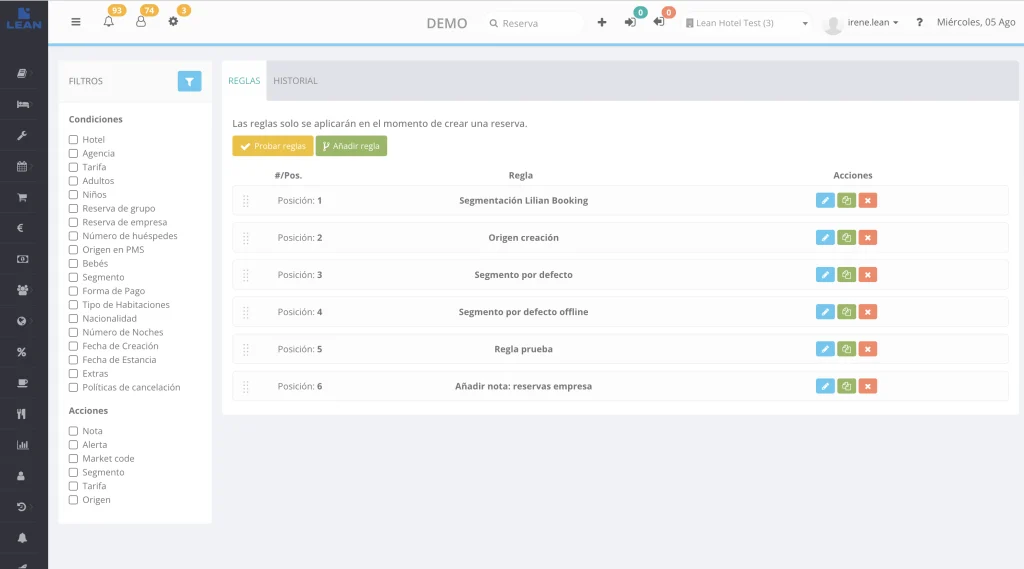
Automation should not replace the team’s judgement, but it can eliminate repetitive tasks and reduce oversights. Some useful automation tools for reception include:
- Confirmation emails.
- Pre-check-in.
- Reminders before arrival.
- Internal alerts.
- Automated notes based on reservation type.
- Payment rules.
- Notices for special bookings.
- Messages associated with specific policies or conditions.
The objective is not to automate everything, but to automate what is repetitive and predictable. If the PMS gives notice of an important condition, sends a clear confirmation or flags a reservation with pending payment, reception works with less mental load.
Daily checklist to reduce human error from the PMS
DGBFDSGVDFGFDS
Start of shift
- Check today's arrivals and departures.
- Check confirmed early check-ins and late check-outs.
- Review blocked rooms and reason.
- Check open incidents.
- Detect pending payments.
- Review bookings with important notes.
- Confirm inherited changes from the previous shift.
Before the arrivals
- Validate assigned rooms.
- Review cleaning statuses.
- Check special requests.
- Confirm guest details if they are already available.
- Check rate or payment conditions.
- Prioritise arrivals with an early estimated time.
- Coordinate with housekeeping if there are any urgent rooms.
During check-in/check-out
- Always check the guest’s record before taking any action.
- Validate room and actual status.
- Check outstanding balance.
- Log any change or incident.
- Avoid external notes.
- Confirm charges before issuing invoice.
- Update room status after check-out.
End of shift
- Register pending bookings.
- Leave issues open with an owner or next step.
- Record payments for review.
- Record room changes.
- Confirm blocked rooms.
- Make special requests visible.
- Check that there are no critical tasks outside the PMS.
Common errors when using the PMS at reception
Having a PMS doesn't guarantee better work if the team maintains bad habits. The most common mistakes are:
- Using the PMS just as a calendar.
- Keep external notes.
- Do not update room statuses.
- Share users.
- No incidents to report.
- Do not check folios before check-out.
- Create duplicate profiles.
- Failing to train the team properly.
- Do not use basic automations.
- Do not define routines by shift.
Prevention hinges on a simple idea: the PMS must be the workplace, not just another tool alongside many others.
Frequently asked questions about reducing human errors at reception with a PMS
What human errors can a PMS reduce at reception?
How does the PMS help avoid errors at check-in?
How to avoid errors between reception and housekeeping
Why are user permissions important at reception?
PMS, integrations, automation, data security and tools to digitise the operation.
You might also like Guest experienceDigital check-in, prior communication, personalisation, upselling and in-stay services.
Discover the product PMS integrationsConnect LEAN with distribution, payments, revenue, BI, CRM and other hotel systems.
Related product POK · Digital pre check-inDigitise the check-in process and connect guest data with hotel operations.
Content produced and reviewed by the LEAN editorial team, specialising in hotel PMS, operations, integrations, and guest experience. Last reviewed: 16 June 2026.