


«The dashboard only adds value if it becomes a habit. There is no need for a long meeting; it is enough to define what is reviewed each day and what is reviewed each week.»
LEAN Team
Hotel System
specialised in PMS
emerging
A KPI dashboard in the PMS should not just be a pretty panel full of charts. Its real function is to help the hotel make better decisions: when to adjust prices, which dates need attention, which channels are performing, which rooms are blocked, which operational tasks are falling behind, and which incidents are affecting the guest experience.
The problem arises when the dashboard accumulates metrics without any order. If the team does not know what to look at or what decision to take afterwards, the panel just becomes decoration. Therefore, before setting up KPIs, it is advisable to define what questions the PMS needs to answer and what review routines each profile will have: management, revenue, reception, housekeeping and operations.

Before setting up the dashboard: define what decisions you want to make
Not all data deserves to be on the dashboard. A metric is only useful if it helps in making a concrete decision. For example, future occupancy can indicate whether prices need to be reviewed; pick-up can show whether a date is moving better or worse than expected; blocked rooms can anticipate availability issues; and open incidents can signal an operational risk before the complaint arrives.
The logic should be this: first the decision, then the KPI. If you do it the other way round, the dashboard fills up with data that no one looks at.
Questions your dashboard needs to answer every morning
A good dashboard should help answer practical questions like:
- How are occupancy levels looking for today and the coming weeks?
- Which dates need attention?
- Which channels are selling the most?
- Are there any rooms that are reserved or out of service?
- What incidents affect operations?
- How is the pick-up evolving?
- Are there any outstanding payments or incomplete bookings?
- Which runs into or out of the box can put pressure on the defence?
If the dashboard answers these questions, it stops being a data panel and becomes a daily management tool.
Key performance indicators (KPIs) that every PMS dashboard should include
The core components of a useful dashboard for small and medium-sized hotels should include business KPIs and operational KPIs. There’s no need to start with dozens of metrics; it’s better to have just a few, which are well-organised and reviewed regularly.
Key performance indicators (KPIs) include: occupancy, ADR, RevPAR, pick-up, bookings by channel, cancellations, revenue by date, available rooms, no-shows and forecast arrivals/departures.
Revenue and distribution KPIs
Revenue KPIs help inform business and distribution decisions:
- Occupation: indicates current and future sales levels.
- ADR: shows the average daily rate.
- RevPAR: relates revenue to available rooms.
- Pick-up: measures how demand changes over a specific period.
- Output per channel: allows you to compare direct sales, OTAs, travel agencies and corporate bookings.
- Cancellations: helps to identify the risk of a drop in occupancy or problems by channel.
Each KPI should be linked to a specific action. If pick-up rates are low on a key date, it may be time to review rates or restrictions. If a channel is generating high sales but has a high cancellation rate, it is worth analysing the terms and conditions. If direct sales fall, it may be necessary to review the booking engine, prices or campaigns.
Operational KPIs for reception and guest rooms
The dashboard should also be used to support day-to-day operations. Some useful KPIs for reception and housekeeping are:
- Today’s arrivals.
- Planned departures.
- Rooms ready.
- Rooms currently being cleaned.
- Rooms are fully booked.
- Open incidents.
- Room changes.
- Pending payments.
- Bookings with incomplete details.
These indicators help the team to anticipate problems before the peak in check-ins or check-outs.
How to organise your dashboard by area so it doesn’t end up in chaos
A common mistake is cramming all the data onto a single screen: revenue, arrivals, cancellations, incidents, channels, rooms and payments. The result is a dashboard that is difficult to read.
The most practical approach is to organise the dashboard into blocks: revenue, occupancy, channels, front desk, housekeeping and incidents. That way, each profile can check what they need without getting lost among metrics that do not help them with their daily work.
Dashboard for management/revenue
The management or revenue perspective should focus on business and strategy:
- Revenue by date or period.
- Current and future employment.
- ADR.
- RevPAR.
- Pick-up.
- Production by channel.
- Cancellations.
- Comparison with previous periods.
This view must help in deciding prices, restrictions, campaigns, distribution, and demand forecasting.
Operational dashboard for reception and housekeeping
The operational view must respond to what is happening in the hotel today:
- Rooms ready.
- Rooms currently being cleaned.
- Rooms are fully booked.
- Early arrivals.
- Planned departures.
- Open incidents.
- Urgent tasks.
- Pending payments or incomplete reservations.
This is where a centralised vision like LEAN's fits in, where the team can check hotel statuses, reservations and daily operations in a single environment. The aim is to reduce phone calls, avoid duplicated information and improve coordination between reception and housekeeping.
Set up alerts, not just charts
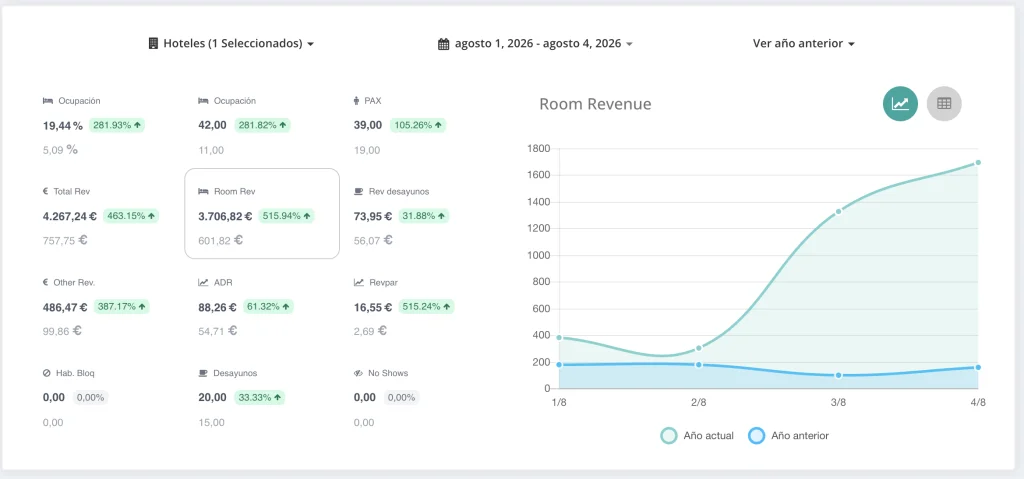
A dashboard should not be limited to showing charts. Its true value lies in detecting deviations before they become problems. For example, low occupancy on key dates, a drop in direct sales, out-of-order rooms, above-normal cancellations, or delayed housekeeping tasks.
Alerts help the team to prioritise. Not everything deserves the same attention, but certain signals need to appear clearly so that management, reception or housekeeping can act in time.
Useful alerts the team can review without wasting time
Some practical alerts are:
- Dates with low pick-up.
- Critical availability.
- Cancellations above normal.
- Rooms out of service.
- Open incidents taking longer than expected.
- Bookings without complete data.
- Outstanding payments prior to arrival.
- Rooms not ready near check-in peak.
The key is not to create too many alerts. If everything notifies you, nothing notifies you. It is better to start with a few critical signals and adjust them according to the hotel's reality.
Common mistakes when setting up dashboards in a PMS
The most common mistakes tend to be:
- Adding too many KPIs.
- Including metrics without a clear objective.
- Do not segment by channel, date or room type.
- Working with duplicate data.
- Do not review the data quality.
- Use the same view for all profiles.
- Do not connect the dashboard with real routines.
- Export everything to Excel and stop querying the PMS.
A useful dashboard should be simple, actionable and tailored for daily use. If no one consults it, it is usually not because there is a lack of data, but because there is too much of it or it is not well organised.
Daily and weekly routine to make the most of the dashboard
The dashboard only adds value if it becomes a habit. There's no need for a long meeting; it's enough to define what is reviewed each day and what is reviewed each week.
The daily review should help control the operation. The weekly review should help detect patterns and make strategic decisions.
Daily review: operational control
In a 10-minute daily review, the team can review:
- Arrivals and departures.
- Rooms available or reserved.
- Early check-ins or late check-outs.
- Open incidents.
- Pending payments.
- Incomplete bookings.
- Critical alerts of the day.
This routine helps to start the shift with a clear vision and reduces improvisation.
Weekly review: strategy and improvement
The weekly review should focus on business and continuous improvement:
- Future occupation.
- Pick-up.
- Production by channel.
- Cancellations.
- ADR.
- RevPAR.
- Weak dates.
- Repeated incidents.
- Recurring blocked rooms.
Decisions should come out of this review: adjusting prices, reviewing channels, bolstering direct sales, changing restrictions, improving coordination with housekeeping or resolving repeated operational problems.
How a PMS like LEAN helps to centralise KPIs without working in Excel
Excel can be useful for ad hoc analysis, but it should not be the main tool for managing daily operations. When the hotel relies on external spreadsheets, duplicate versions appear, data becomes outdated, and decisions are based on information that no longer reflects reality.
A PMS like LEAN helps centralise bookings, statuses, operational data and reports in a single environment. This allows management, reception, revenue and housekeeping to work with more reliable and actionable information, without constantly jumping between tools.
The aim is not to have more data, but to have them better organised: a main source, profile-based views, useful alerts and clear review routines.
What KPIs should a hotel PMS dashboard have?
How often should I check the PMS dashboard?
What mistakes should I avoid when creating a KPI dashboard?
How does a dashboard help reception and housekeeping?
PMS, integrations, automation, data security and tools to digitise the operation.
You might also like Guest experienceDigital check-in, prior communication, personalisation, upselling and in-stay services.
Discover the product PMS integrationsConnect LEAN with distribution, payments, revenue, BI, CRM and other hotel systems.
Related product POK · Digital pre check-inDigitise the check-in process and connect guest data with hotel operations.
Content produced and reviewed by the LEAN editorial team, specialising in hotel PMS, operations, integrations, and guest experience. Last reviewed: 16 June 2026.