


How to organise daily reception tasks from the PMS without wasting time switching between tools
Reception rarely fails due to lack of effort. It usually fails due to working with too many channels at once: scattered notes, internal messages, “support” listings, and tasks that rely on shift memory. The result is well-known: queues, billing errors, makeshift room changes, and the feeling that the day is “running” the team.
The most stable way to organise operations is to treat the PMS as the central daily dashboard: a single place for reservations, check-ins, check-outs, rooms, and incidents. It's not about knowing more functionalities, but about applying a repeatable daily method supported by a centralised view.

The usual problem: reception works with scattered information and priorities that change hourly.
Reception rarely fails due to lack of effort. It usually fails due to working with too many channels at once: scattered notes, internal messages, “support” listings, and tasks that rely on shift memory. The result is well-known: queues, billing errors, makeshift room changes, and the feeling that the day is “running” the team.
The most stable way to organise operations is to treat the PMS as the central daily dashboard: a single place for reservations, check-ins, check-outs, rooms, and incidents. It's not about knowing more functionalities, but about applying a repeatable daily method supported by a centralised view.
Signs that your team needs to tidy up operations from the PMS
If any of these points sound familiar, the problem is with the system (not the attitude): the same data is asked for several times, reception doesn't know which rooms are ready, there are notes on different media, tasks are duplicated, and issues are communicated late.
The starting point: centralise your day from a single dashboard
The first step is for the shift to begin with a complete “snapshot” of the day. In practice, reception needs to see: active bookings, arrivals, departures, available rooms, cleaning statuses, pending payments, open incidents, and shift priorities. When that snapshot is in a single view, interruptions are reduced and prioritisation is improved.
In LEAN, the idea is precisely that: to centralise reservations, room status, check-in and check-out in a single view to avoid jumping between tools.
What to check at the start of each shift at reception
A brief (but fixed) review avoids a “blind start”. At a minimum:
- Scheduled departures (and if late check-out has been confirmed).
- Today's arrivals and estimated times (including requested early check-ins).
- Blocked rooms and reason.
- Outstanding payments or reservations with special conditions.
- Special requests and open incidents.
The objective is simple: start the shift with visible and shared priorities.
Structure the day around critical moments, not as an endless to-do list
Reception works better in time blocks than in “loose tasks”. In hotels, the same cycle almost always repeats: initial preparation, checkout period, coordination with housekeeping, arrival preparation, check-in peak, and shift closure. If each block has clear priorities, improvisation is reduced.
First hour of the shift: review of departures, payments and outstanding items
In the first hour, it's advisable to address what causes the most discrepancies at the end of the day: scheduled check-outs, invoices and charges, pending payments, deposits if applicable, and any issues carried over from the previous shift. This prevents the peak of departures from turning into last-minute corrections.
Before the peak arrivals: room allocation and special cases
This is where the guest experience is won (or lost). Before they arrive en masse, check: assigned rooms, special requests, reservations with notes, groups, returning guests, pending payments, and early check-in requests. The difference between a smooth check-in and a queue often lies in this preparation.
End of shift: handover of information without relying on memory
An untracked shift change creates recurring issues. Before you leave, record what the next team needs to operate without guesswork: open issues, pending reservations, room changes, payments to review, and special requests.
Check-ins and check-outs: how to reduce repetitive steps and avoid omissions
Check-in and check-out are the two most visible processes for the guest. A well-organised PMS allows them to be executed uniformly, with minimal and controlled steps. If previous information exists (e.g., data already collected), it should be integrated into the same record to avoid asking for the same thing again and creating friction.
Minimum checklist for a seamless check-in
Before we begin, please confirm the essentials: booking located, details reviewed, room type confirmed, conditions understood, internal notes consulted, cleaning status validated, and outstanding balance checked. This reduces waiting times and avoids “corrections” in front of the guest.
Minimum checklist for a correct check-out closure
To close without discrepancies: charges reviewed, consumption added, invoice if applicable, departure registered, room status updated, and any issues communicated to housekeeping or maintenance. Check-out does not end with payment: it ends when the room is vacated and the hotel is not left with a hidden problem.
Room assignment: prioritise actual availability, not just calendar bookings
Room assignment isn't about fitting names into a calendar. Actual assignment considers room type, cleanliness status, maintenance, guest requests, early check-ins, stays, and planned rotation. If you don't look at actual availability, the probability of last-minute changes (and complaints) increases.
What to check before marking a room as ready for handover
Before handing over a key, it's advisable to ensure four things: final cleaning completed, inspection if applicable, no outstanding issues, correct room category, and extras prepared. This “final stretch” avoids the classic complaint of “I've been given a room that wasn't ready.”.
Building reception-to-flat communication: eliminate unnecessary calls with real-time information
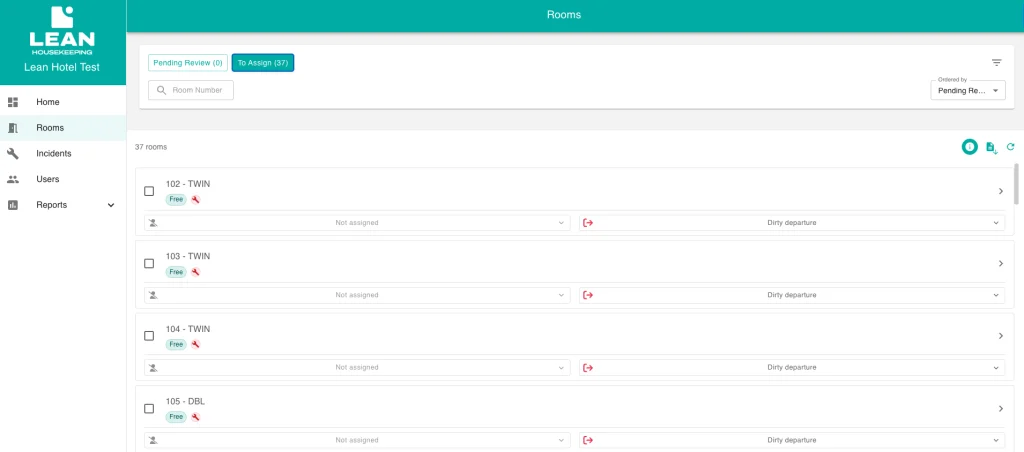
One of the biggest areas for improvement is to stop coordinating via calls and sporadic messages. Reception needs to know which room is pending, in progress, or available; housekeeping needs to see urgent requests and priority changes without constant interruptions.
Here the LEAN Housekeeping App fits in: an Android app connected to the PMS to update statuses in real-time and coordinate work.
Urgent cleaning requests from reception
Typical scenario: early check-in or a room change due to an issue. Instead of calling and “chasing”, the urgent request is launched from the tool and the floor receives priority without intermediate steps. This reduces the most common bottleneck: urgent issues that end up in conversations without traceability.
Room status update from mobile
The operational flow is straightforward: floors update the status when they start or finish a task, and reception queries the information in real-time. When this is done with discipline, the number of “is it done yet?” calls decreases and outdated availability is reduced.
Minibar and incidents: immediate logging without paper notes
A very practical point is to record minibar charges and incidents from your mobile and have it connected to the PMS. The benefit is twofold: fewer forgotten items and fewer manual steps at the end of the day (when errors are most common).
Incident management: register, assign and track from the same operational workflow
An incident should not be left as an informal conversation. If it is not recorded, it is lost; and if it is lost, it returns in the form of a complaint or an unexpected room being blocked. The operational procedure is: to record it with the room number, reason, priority, and resolution status, so that reception understands the impact on availability and can inform the guest coherently.
How to classify incidents so the team knows what to attend to first
In hotels, a simple classification system works:
- Urgent: Prevent room delivery.
- Important: It affects comfort but allows temporary stay with measures.
- Programmable: maintenance that can be scheduled without disrupting operations.
This way, you prevent “everything from being urgent” and the team from losing its judgement.
Room changes: record the reason to prevent the problem from recurring
When a guest changes rooms, record the reason: noise, breakdown, cleaning, preference, or specific incident. This improves traceability, avoids repeated decisions, and helps detect “problematic” rooms before they generate further complaints.
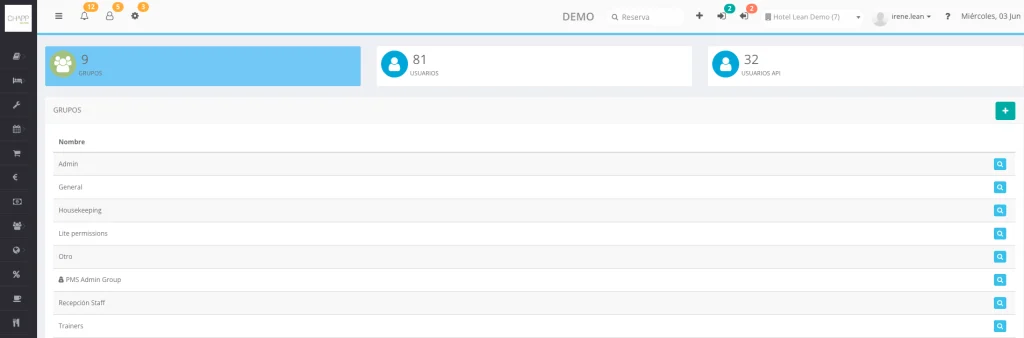
Users and permissions: each receptionist must only view what is necessary for their work
Simplifying the dashboard not only reduces time: it reduces errors. When everyone sees “everything”, the risk of touching settings or information that doesn't correspond increases. In LEAN, the focus is on configuring individual environments by profile so that each user sees the modules they need for their shift, without accessing settings or information that doesn't belong to them.
Example operating environment for reception
A typical reception environment should focus on: reservations, calendar, arrivals and departures, room statuses, payments, notes, and incidents. Advanced configurations and specific reports can be reserved for responsible profiles.
Daily reception routine in 15 minutes: checklist from the PMS
This block is intended to be copied and used as an internal procedure.
Shift start
- Review confirmed departures, arrivals, and early/late movements.
- Validate ready vs blocked rooms and reason.
- Detect outstanding payments and bookings with special conditions.
- Read open incidents and critical notes from the previous shift.
Before the peak check-ins
- Confirm priority rooms for early arrivals.
- Review floor status and active priorities.
- Review booking notes (requests, VIP, groups, returning guests).
- Check pending payments and sensitive policies (deposits, no-shows).
Closing and shift change
- Register outstanding items for the day (bookings to review, outstanding payments).
- Leave incidents open with status and next step.
- Document room changes and reasons.
- Note any special requests that the next team needs to follow up on.
Simple metrics to know if the organisation is functioning from the PMS
Measuring isn't bureaucracy if you choose few operational indicators. The most useful tend to be: average check-in time, rooms ready by the target time, open issues at shift change, billing errors, room changes, and volume of calls between reception and floors. If calls drop and issues “move” with follow-up, the method is working.
Frequently asked questions about organising daily reception tasks from the PMS
What tasks should reception review at the start of the shift?
A solid start to the shift involves reviewing the day's check-outs and arrivals, ready and blocked rooms, outstanding payments, special requests, and open issues. With this overview, the team can prioritise without improvising and reduce queues. The key is to do it the same way every time: a brief routine that avoids “surprises” when the lobby gets busy.
How can a PMS reduce calls between reception and housekeeping?
Reducing uncertainty: if the PMS displays real-time updated room statuses, reception stops calling to confirm if a room is ready. Furthermore, it allows for priority marking (e.g., an early check-in) without relying on scattered messages. When a Housekeeping App is connected, updates from mobile reinforce that coordination.
What information should be recorded when changing a room guest?
It is advisable to record the reason for the change, the initial room and the new one, the related incident (if any) and the action taken. This avoids repeating the same problem with future guests, improves traceability between shifts and facilitates cause analysis (rooms with noise, recurring breakdowns, etc.).
How do I prevent each receptionist from seeing information they don't need?
Defining profiles and permissions by role and using individual accounts. The idea is that each receptionist only sees the modules necessary to operate their shift (bookings, arrivals/departures, payments, notes), while advanced configurations and reports are reserved for managers. In LEAN, this is approached with individual environments per profile.
Which room statuses should reception check from the PMS?
The most useful thing is a simple and consistent set: pending/dirty, cleaning, ready, pending inspection (if applicable) and blocked due to an issue. The important thing isn't the exact name, but that the team understands the same thing and that the status is updated in a timely manner, to avoid handing over rooms before they are actually available.
What metrics can be used to evaluate if the reception is better organised?
Simple operational indicators: average check-in time, percentage of rooms ready by the target time, open incidents at shift change, billing errors, room changes, and internal call volume. If these decrease or stabilise, it usually indicates that the PMS is being used as a central dashboard and that the team is working methodically.
You may also be interested in



REQUEST YOUR DEMO TODAY
Discover how Lean Hotel System can transform your hotel business